If you’ve spent years perfecting the look of your home — the trim colors, the landscaping, the porch light that took three tries to get right — the idea of bolting a bulky white plastic camera to the front wall probably makes you wince. For a lot of homeowners, this is exactly why they put off installing a security system. They want the protection, but not at the cost of everything they’ve worked to build visually.
The good news is that modern cameras, thoughtful placement, and careful cable management mean you absolutely do not have to choose between feeling safe and loving the way your home looks. The difference between a camera that disappears into the architecture and one that sticks out like a sore thumb usually comes down to planning, not equipment cost.
This guide walks through how to think about cameras as part of your home’s design from the start — and when it makes sense to bring in a professional for security camera installation so the end result looks intentional rather than patched on. Whether you have a modern minimalist build, a century-old craftsman, or something in between, the principles are the same: start with the design, pick hardware that blends, and hide what needs hiding.
Start with Design, Not with Cameras
The single most common mistake homeowners make is buying the cameras first and then figuring out where to put them afterward. That’s how you end up with a mounting arm bolted mid-wall on a beautiful clapboard facade, or a doorbell camera in bright silver on a black door.
Before you look at a single product, do an aesthetic audit of your home’s exterior. Note your trim color, the finish of your existing fixtures (door hardware, porch lights, house numbers), the dominant architectural features, and any shadow lines created by eaves, gables, or overhangs. Those details dictate what camera finish and form factor will blend in.
Next, map your actual coverage needs. Walk the perimeter and ask: where would a person actually approach the house? Where are the blind spots from the street? Which doors and windows are most vulnerable? Most homes need three to five well-placed cameras, not twelve scattered ones. Fewer cameras, placed better, look infinitely cleaner than cameras that cover every square inch but turn the exterior into a surveillance grid.
Choose Cameras That Blend, Not Clash
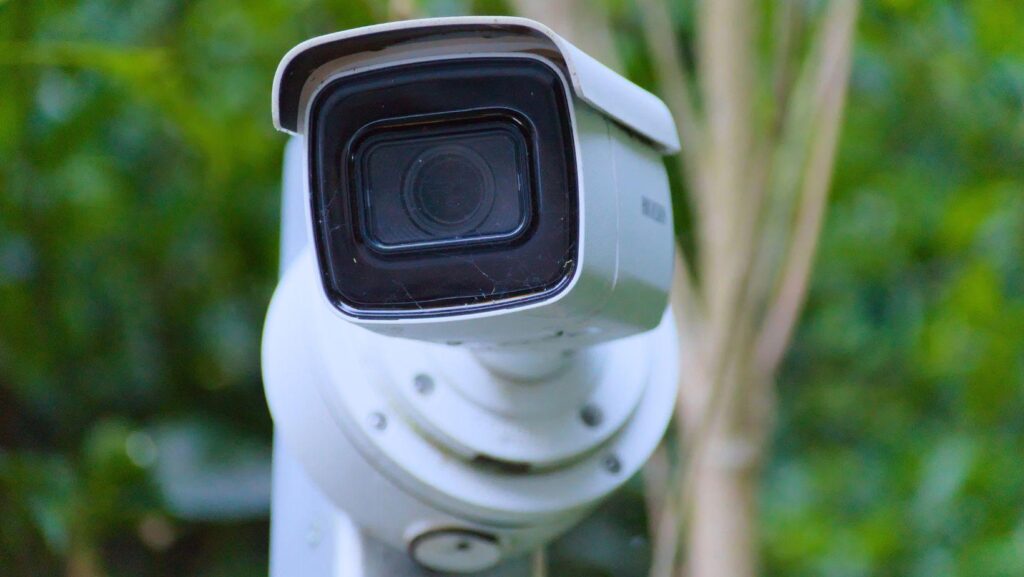
Camera finish matters more than people realize. A matte black camera on black trim disappears. A white camera on black trim shouts. Manufacturers now offer most popular models in matte black, satin white, bronze, and sometimes brass — match the finish to your existing exterior fixtures the same way you would coordinate door hardware with light fixtures.
Form factor is the next decision. Dome cameras have a rounded, compact silhouette that reads as less industrial and works well on modern and minimalist homes. Bullet cameras are more visually aggressive but offer better reach for long driveways or far corners of a property. Turret cameras are a middle-ground option that looks clean while still offering strong range. For architecturally sensitive installations — historic homes, high-end exteriors — there are now genuinely miniature cameras and semi-concealed options designed to tuck into soffits and eaves where you’d never notice them.
Don’t forget the doorbell. A smart video doorbell is the most visible camera on your house because it sits at eye level next to the front door. Pick one that matches your door hardware — brass with brass, matte black with matte black, satin nickel with satin nickel. A mismatched doorbell can undo the look of an otherwise perfectly coordinated entryway.
Placement That Works Visually and Functionally
Where you mount a camera matters as much as what camera you pick. Cameras placed at eye level on flat wall surfaces look like industrial equipment. Cameras tucked up under a roofline, recessed into a soffit, or nestled against an architectural shadow line almost vanish.
The best placement for most exterior cameras is under the eaves or along the roofline — eight to ten feet up, angled down. This position gives you a better field of view, protects the camera from weather, and hides it in the natural shadow that eaves create. Mounting under a deep porch overhang or soffit does the same thing for your front entry.
Use existing architectural features as anchor points. A gable corner, a porch beam, a column capital, or a decorative trim detail can visually “absorb” a camera mount so it reads as part of the architecture rather than an add-on. Avoid mounting on flat, visible siding wherever possible — there’s nothing to hide behind, and the mount becomes the first thing anyone notices.
If you have a second story, take advantage of it. A camera at second-floor height looking down toward an entry point is usually both less visible and more effective than one mounted at six feet near the door.
Hiding the Cables (The Part Everyone Gets Wrong)
Here’s the uncomfortable truth: visible cables ruin the look of cameras far more than the cameras themselves do. You can pick the most elegant, color-matched camera on the market, and if there’s a white wire snaking down your siding to a power outlet, the whole effect collapses.
Cables need a plan. The best approach — and the reason most professional installations look so much cleaner than DIY ones — is to run cables inside the structure. That means up through the soffit, across the attic, and down through an interior wall cavity to a hidden terminal point. This keeps the exterior completely clean and is the standard for any serious camera install.
If interior runs aren’t possible, the next best option is color-matched surface conduit. Paintable raceways or metal conduit that matches your siding color hide cables effectively, especially when routed along existing trim lines where the eye doesn’t linger. What you never want is a bare white or black cable tacked to a painted wall — that’s the DIY signature that tells everyone a camera was retrofitted.
PoE (Power over Ethernet) systems simplify things considerably by combining power and data into a single cable, which means one thinner run instead of two. For most multi-camera installations, PoE is both easier to hide and more reliable than a mix of Wi-Fi plus power adapters.
Integrating Cameras Into Specific Style Categories
Different homes call for different approaches.
Modern and minimalist homes benefit from matte black cameras mounted flush with clean architectural lines. The restraint of the camera should match the restraint of the architecture — no decorative mounts, no extra brackets.
Traditional and colonial homes look best with bronze or satin-finish cameras in softer dome shapes, tucked under deep eaves and away from the symmetry of the front facade. Consider placing cameras on side elevations rather than the front where possible.
Craftsman and bungalow-style homes usually have deep overhangs and prominent wood trim — both are gifts for camera placement. Wood-tone or bronze cameras blend beautifully into exposed rafter tails and beam ends.
Mid-century modern homes reward simple geometric shapes, often in matte finishes, mounted cleanly along the roofline without decorative accessories.
Farmhouse-style homes typically feature white trim and dark accents. Pick cameras that match one or the other and mount them under porch overhangs or along the soffit edge.
When DIY Installation Hurts the Look (and Your Coverage)
DIY camera installation can work beautifully for a single front-door camera. It tends to fall apart as soon as you need multiple cameras coordinated, concealed cable runs, or integration with an existing smart home. The giveaways are familiar: exposed cables zip-tied along siding, mounts at inconsistent heights, cameras angled slightly crooked, screws in places that don’t quite line up with trim. Individually, each is a small thing. Together, they make a home look visually patched rather than protected.
There are also functional consequences. Improper weatherproofing of mounting holes leads to water infiltration and rust stains running down your siding within a year. Cables routed through the wrong parts of an attic can damage insulation or create hotspots. Cameras mounted at the wrong angle capture the top of people’s heads instead of their faces.
A good professional installer thinks about your home’s appearance as part of the job, not an afterthought. They know how to run cables through existing wall cavities, how to match mounting hardware to trim, how to weather-seal penetrations so they don’t stain, and how to coordinate multiple cameras so the finished system looks designed rather than assembled.
Small Touches That Make a Big Difference
The last 10 percent is where a clean install becomes an invisible one. Remove manufacturer stickers and visible brand logos from camera bodies. Match mount colors to the surface behind them, not just to the camera. Coordinate every camera on the property to the same finish — mixing black and white cameras reads as careless even if both match something. Angle cameras flush with eaves rather than jutting out on long arms. Use landscaping and lighting as cover: a trellis, a well-placed hedge, or a coach light can visually anchor a camera so it reads as belonging there.
None of these touches change what the camera does. All of them change how your home feels when you walk up to it.
The Bottom Line
Security cameras don’t have to be visual pollution. With the right finish, thoughtful placement, properly hidden cables, and — when the job deserves it — a professional who understands that your home’s appearance is part of the brief, cameras become one more detail that disappears into the architecture. You get the protection without the industrial look, and you get to keep the home you worked so hard to design.